Apache Superset
Apache Superset supports querying and visualizing both internal data and external data in StarRocks.
Prerequisites
Make sure that you have finished the following installations:
-
Install the Python client for StarRocks on your Apache Superset server.
pip install starrocks -
Install the latest version of Apache Superset. For more information, see Installing Superset.
Connectivity
Make sure that your PhoenixAI cluster's inbound rules allow query requests from your Apache Superset server.
Integration
Create a database in Apache Superset:
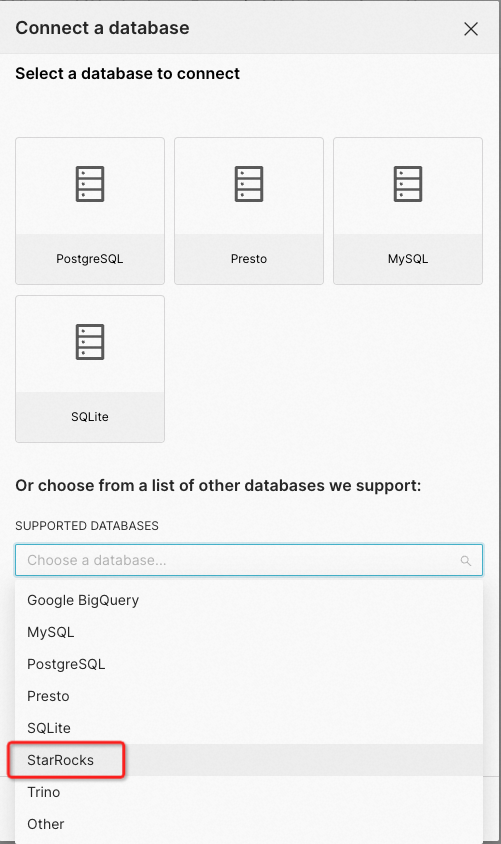
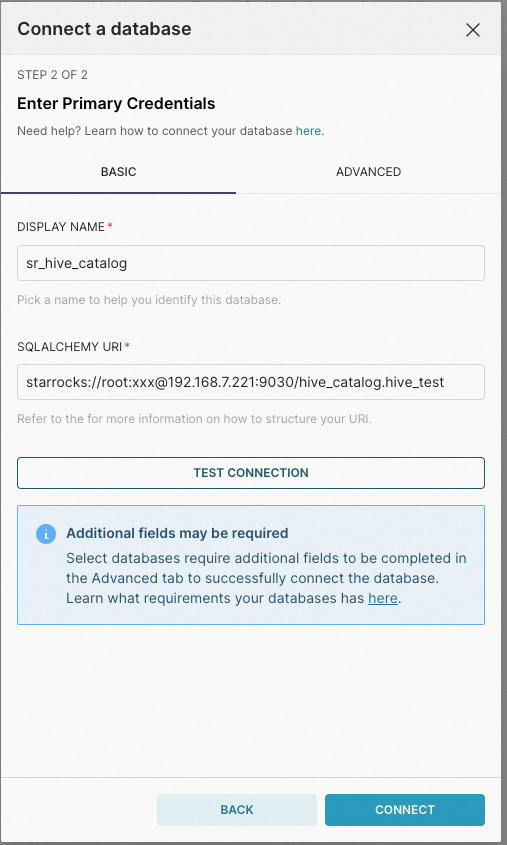
Take note of the following points:
-
For SUPPORTED DATABASES, select StarRocks, which will be used as the data source.
-
For SQLALCHEMY URI, enter a URI in the StarRocks SQLAlchemy URI format as below:
starrocks://<User>:<Password>@<Host>:<Port>/<Catalog>.<Database>The parameters in the URI are described as follows:
User: the username that is used to log in to your StarRocks cluster, for example,admin.Password: the password that is used to log in to your StarRocks cluster.Host: the endpoint of your PhoenixAI cluster.Port: the query port of your PhoenixAI cluster, for example,9030.Catalog: the target catalog in your StarRocks cluster. Both internal and external catalogs are supported.Database: the target database in your StarRocks cluster. Both internal and external databases are supported.