Hex
Hex supports querying and visualizing both internal data and external data in PhoenixAI.
Prerequisites
Make sure that your PhoenixAI cluster's inbound rules allow query requests from your Hex server.
Integration
Add a data connection in Hex. Note that you must select MySQL as the connection type.
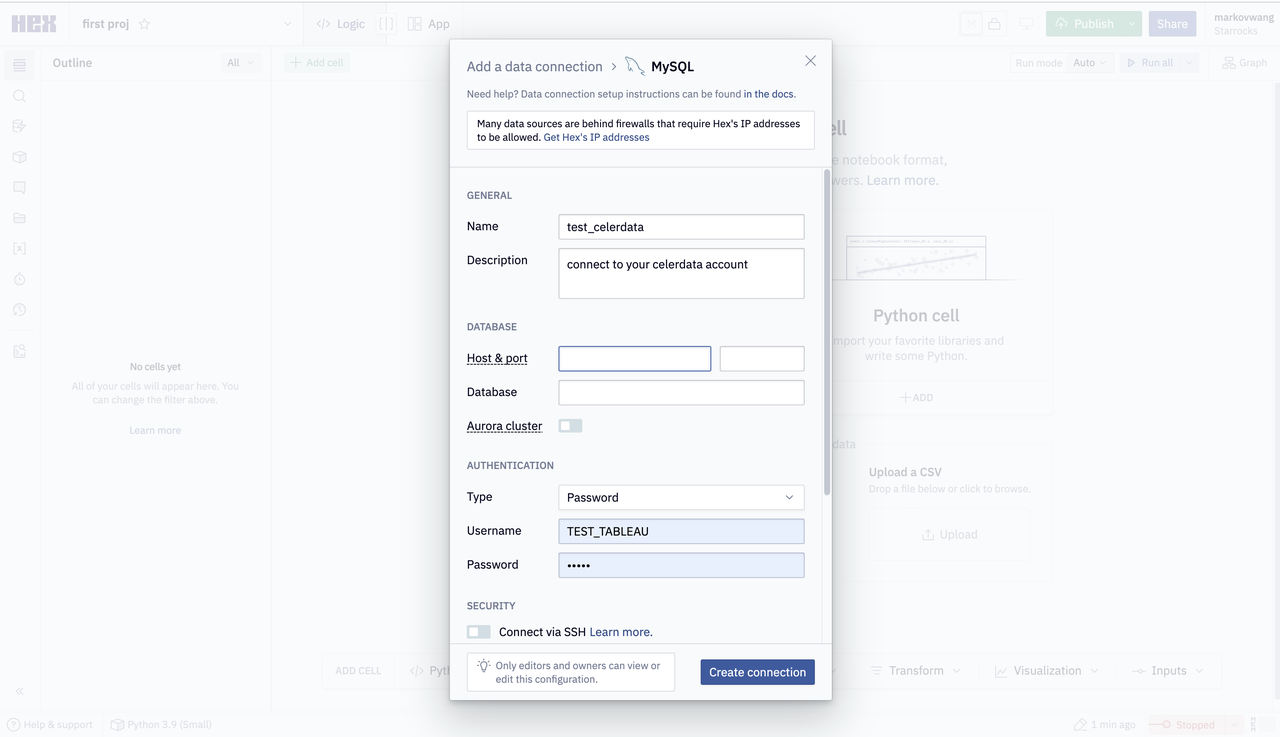
The parameters that you need to configure are described as follows:
- Name: the name of the data connection.
- Host & port: the public endpoint and query port of your PhoenixAI cluster. An example query port is
9030. - Database: the data source that you want to access in your PhoenixAI cluster. The value of this parameter is in the
<catalog_name>.<database_name>format.catalog_name: the name of the target catalog in your PhoenixAI cluster. Both internal and external catalogs are supported.database_name: the name of the target database in your PhoenixAI cluster. Both internal and external databases are supported.
- Type: the authentication method that you want to use. Select Password.
- User: the username that is used to log in to your PhoenixAI cluster, for example,
admin. - Password: the password that is used to log in to your PhoenixAI cluster.