Compute Replica
Compute Replica keeps redundant copies of a warehouse's local cache across multiple Compute Nodes (CNs), so query latency stays predictable when nodes restart, scale, undergo rolling upgrades, or become unavailable on the network.
On the 3.5.x line, Compute Replica is experimental. You can configure and use it, but the failover-routing reliability improvements described in Version availability are not present, so failover behavior under node churn is not yet dependable.
On the 4.x line, Compute Replica is in beta. The query-planner and node-liveness improvements that make multi-replica failover dependable are included.
Overview
In a PhoenixAI Cloud shared-data warehouse, the source of truth for your data lives in object storage (such as Amazon S3, Google Cloud Storage, or Alibaba Cloud OSS), and data reliability is guaranteed by the cloud provider's object storage. Each Compute Node keeps a local cache of the tablet data it serves so that queries do not have to read from object storage on every request.
By default, each tablet is cached on a single Compute Node. This creates a gap in performance reliability:
- Cache loss on HA events — when a CN crashes, runs out of memory, or is restarted during a rolling upgrade, its tablets are rescheduled onto a different CN whose cache is cold. The next queries trigger a flood of cache misses and slow remote reads, causing a sharp spike in tail latency. This is especially painful for real-time, customer-facing workloads with strict P99 SLAs.
- Cache invalidation on scaling — scale-out and scale-in reshuffle tablets across nodes, invalidating large amounts of cache and degrading query performance until the cache warms up again.
- Traffic hotspots — all concurrent access to a given tablet concentrates on the one CN that caches it.
Running latency-sensitive, customer-facing analytics require the removal of these latency cliffs without sacrificing the cost benefits of shared-data architecture. Compute Replica answers that need by replicating the cache layer (not the storage) across multiple CNs.
Compute Replica makes tail latency predictable during node churn, scaling, and rolling upgrades. It does not make a steady-state query faster. The benefit shows up precisely when something disrupts the cluster.
In testing of a real-time, customer-facing analytics workload, a single Compute Node restart drove P99 query latency up by roughly 3.5× when each tablet was cached on only one node. With two compute replicas, synchronous cache replication, and index-level warmup, the same restart caused only about a 20% increase in P99 latency — keeping it within the workload's sub-second SLA.
How it works
Compute Replica schedules each tablet onto more than one CN and keeps those nodes' caches warm. When one node goes down, the query planner routes around it to a surviving node that already holds a warm copy of the tablet — avoiding a cold read from object storage.
Before — single replica: when a node fails, its cached tablets are gone. Queries fall back to slow remote reads from object storage.
flowchart TB
    FE["Query planner"]
    FE --> CN1["CN-1<br/>cache: T1–T3"]
    FE --> CN2["CN-2<br/>cache: T4–T6"]
    FE --> CN3["CN-3 down<br/>cache T7–T9 lost"]
    CN3 -. "cold remote read" .-> OS[("Object storage — source of truth")]
    classDef down fill:#fde2e2,stroke:#dc2626,color:#7f1d1d;
    class CN3 down;
After — compute_replica = 2: every tablet is cached on two nodes. When a node fails, the planner skips it and a surviving node serves the affected tablets from its warm replica cache.
flowchart TB
    FE["Query planner"]
    FE --> CN1["CN-1<br/>primary: T1–T3<br/>replica: T7–T9"]
    FE --> CN2["CN-2<br/>primary: T4–T6<br/>replica: T1–T3"]
    CN3["CN-3 down<br/>tablets T7–T9 rerouted"]
    CN1 -. "serves T7–T9 from warm replica cache" .-> FE
    OS[("Object storage — rarely accessed")]
    classDef down fill:#fde2e2,stroke:#dc2626,color:#7f1d1d;
    class CN3 down;
Compute Replica combines three independent capabilities:
| Capability | What it does | Controlled by |
|---|---|---|
| Multiple compute replicas | Schedules each tablet onto N Compute Nodes instead of 1, providing failover targets and higher concurrency against a single tablet. | compute_replica |
| Cache replication | When new data is written (loads, compaction, DDL), it is replicated into the caches of the other replica CNs so more than one node stays warm. | replication_type |
| Cache warmup | When a tablet is newly placed on a CN (for example, after scale-out), the CN proactively pulls metadata/data from object storage before the replica serves traffic. | warmup_level |
A replica becomes visible to queries only after its warmup completes. Cache replication failures never affect transaction commit or data consistency — they only affect whether a peer node's cache is warm.
Enable Compute Replica in the PhoenixAI Cloud console
You can configure Compute Replica per warehouse directly in the console. The cluster must be in the Running state, and you need the cluster_admin role.
1. Open the warehouse
-
Sign in to the PhoenixAI Cloud console.
-
On the Clusters page, click the elastic cluster you want to configure.
-
On the cluster detail page, click the Warehouses tab.
-
Click the warehouse you want to configure (for example,
default_warehouse).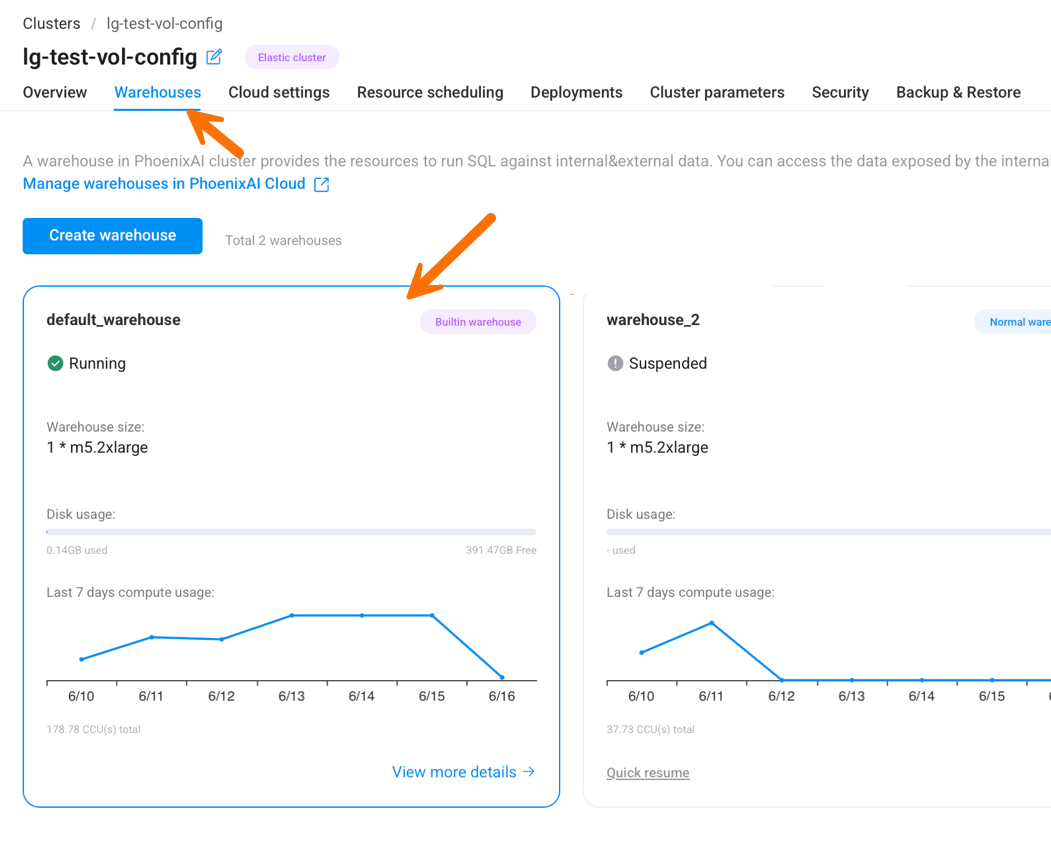
2. Open the Compute Replica tab
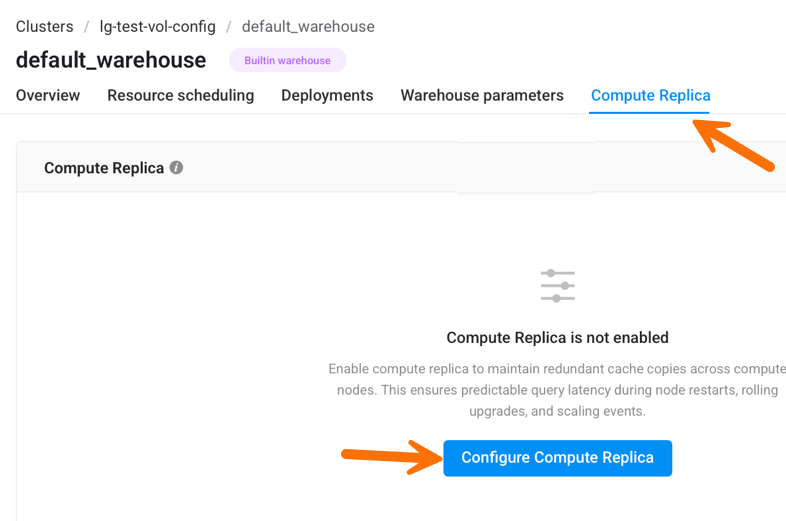
On the warehouse detail page, click the Compute Replica tab. If Compute Replica has not been enabled yet, you see an empty state. Click Configure Compute Replica.
3. Configure and enable
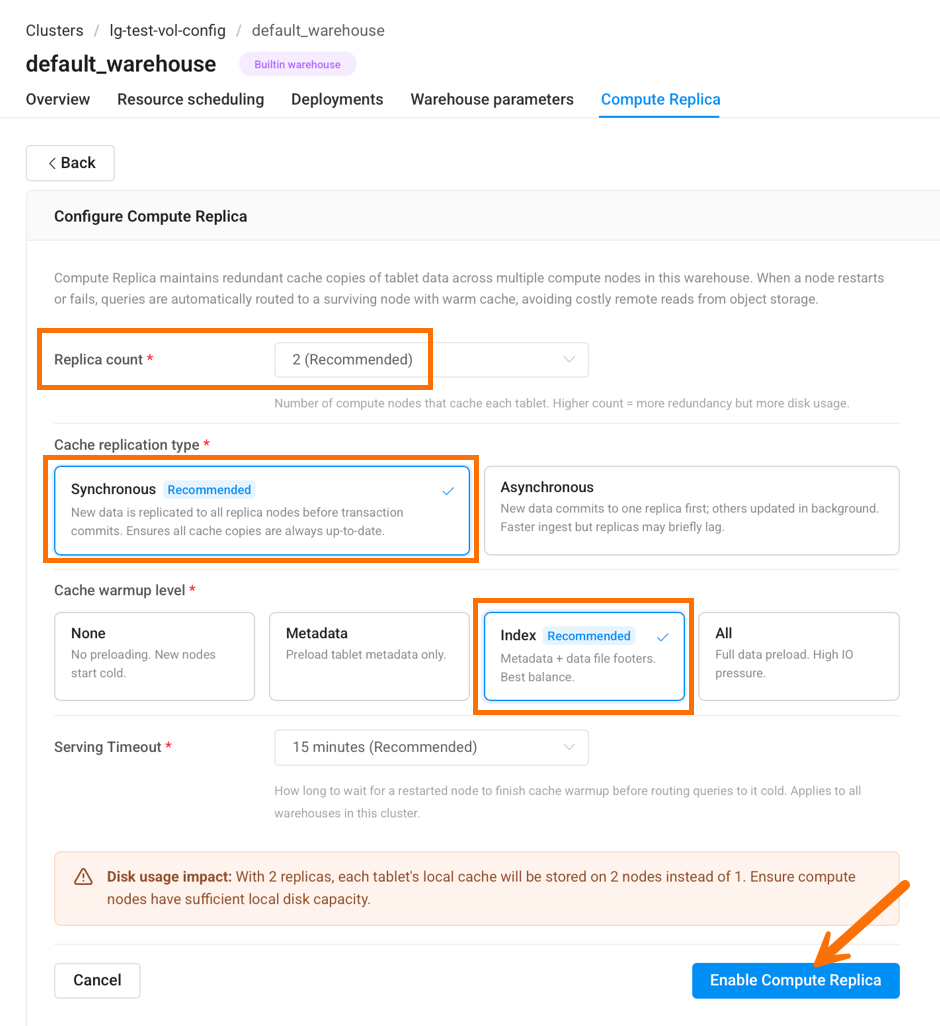
Set the following options, then click Enable Compute Replica.
| Field | Recommended | Description |
|---|---|---|
| Replica count | 2 | Number of Compute Nodes that cache each tablet. A higher count adds redundancy but uses more local disk. |
| Cache replication type | Synchronous | Synchronous replicates new data to all replica nodes before the transaction commits, so every cache copy is always up to date. Asynchronous commits to one replica first and updates the others in the background — faster ingest, but replicas may briefly lag. |
| Cache warmup level | Index | Determines how much a newly placed node preloads before serving. Index (metadata plus data-file footers) is the recommended balance. None starts cold; All preloads full data files and creates significant I/O pressure. |
| Serving timeout | 15 minutes | How long to wait for a restarted node to finish cache warmup before routing queries to it cold. This setting applies to all warehouses in the cluster. Keep the recommended value unless advised otherwise. |
With 2 replicas, each tablet's local cache is stored on 2 nodes instead of 1. Make sure your Compute Nodes have sufficient local disk capacity before enabling.
4. View, edit, or disable
After Compute Replica is enabled, the Compute Replica tab shows a summary of the current replica count, replication type, warmup level, and serving timeout.
- Click Edit to change any setting. Changes take effect without re-creating the warehouse.
- Click Disable to turn Compute Replica off. The warehouse returns to a single cache copy per tablet.
Configure Compute Replica with SQL
The same configuration is available through warehouse properties. This is useful for scripting or for environments where you manage warehouses with SQL.
Set the properties when creating a warehouse:
CREATE WAREHOUSE <warehouse_name>
PROPERTIES (
    "compute_replica"  = "2",
    "replication_type" = "SYNC",
    "warmup_level"     = "INDEX"
);
Or modify an existing warehouse:
ALTER WAREHOUSE <warehouse_name>
SET (
    "compute_replica"  = "2",
    "replication_type" = "SYNC",
    "warmup_level"     = "INDEX"
);
Each property can be changed independently:
ALTER WAREHOUSE <warehouse_name> SET ("compute_replica"  = "3");
ALTER WAREHOUSE <warehouse_name> SET ("replication_type" = "ASYNC");
ALTER WAREHOUSE <warehouse_name> SET ("warmup_level"     = "INDEX");
You can inspect the current values in the Property column of SHOW WAREHOUSES.
Properties reference
compute_replica
- Default:
1 - Description: Number of compute replicas — the number of Compute Nodes that cache each tablet.
The maximum value of compute_replica is limited by the FE dynamic configuration item lake_warehouse_max_compute_replica (default: 3).
replication_type
- Default:
NONE - Description: Cache replication type. When data is written into a CN, it is replicated to the caches of the other replica CNs according to this setting. Valid values:
NONE(default): No replication.SYNC: New data is replicated to all replica CNs synchronously. When the loading transaction succeeds, the data is present in all compute replicas.ASYNC: New data commits to at least one replica when the transaction succeeds; the remaining replicas are updated in the background.
- The replication timeout is set by the CN dynamic configuration item
starlet_cache_replication_timeout_ms(default:5000ms). - The background replication thread count (effective for
ASYNConly) is set by the CN dynamic configuration itemstarlet_cache_thread_num(default:16).
Replication failure does not affect transaction commit or data consistency. It only affects whether a peer replica's cache is warm. Common causes are replication timeouts from network or disk I/O, or a source/target CN failing mid-replication. See Observability for troubleshooting.
warmup_level
- Default:
NONE - Description: Cache warmup level. When a tablet is first placed on a CN, the CN warms up the latest version of the tablet once according to this level. The replica is not visible to queries until warmup completes. Valid values:
NONE(default): No warmup; new nodes start cold.META: Warm up the latest tablet metadata only.INDEX: Warm up the latest tablet metadata plus the footer/index portion of the corresponding data files.ALL: Warm up the latest tablet metadata plus the full data files (heavy I/O).
- The warmup timeout is set by the FE dynamic configuration item
lake_compute_replica_warmup_timeout_secs(default:900seconds). After this timeout, FE marks the replica visible even if warmup has not finished. - The warmup thread count is set by the CN dynamic configuration item
tablet_warmup_max_threads(default:4).
If warmup is interrupted by a CN failure, FE considers the warmup successful and sets the replica visible after the warmup timeout. See Observability for troubleshooting.
Best practices
The recommended production configuration is 2 replicas, synchronous replication, and index-level warmup:
ALTER WAREHOUSE <warehouse_name> SET (
    "compute_replica"  = "2",
    "replication_type" = "SYNC",
    "warmup_level"     = "INDEX"
);
- Two replicas with
SYNCguarantees a second warm copy when one CN crashes or runs out of memory, allowing close to 100% local cache hits during the failure. More replicas mean more local disk cost, and synchronous replication has negligible impact on loading performance. INDEXwarmup means that when tablets are redistributed during scale-out or scale-in, the new node immediately warms metadata plus data-file footers, so query latency stays roughly flat across scaling events. AvoidALLin most cases — it loads every data file and creates significant I/O pressure.
Together, these settings bring shared-data performance reliability up to parity with multi-replica shared-nothing behavior.
Version availability
The configuration surface — replica count, cache replication type, and warmup level — and the cache-replication and warmup behavior itself are available in both the 3.5.x and 4.x lines. That part of the feature is not what differs between versions.
What differs is failover-routing reliability. Dependable failover relies on a set of query-planner, node-liveness, and cache-warmup improvements that govern how queries are routed during node churn:
- the query planner degrades to a single-replica plan instead of routing the query to a cold node;
- a node's liveness is reported promptly to the scheduler when it shuts down or crashes, so its replicas are no longer selected; and
- when a node rejoins after a restart, its replica is re-warmed and held out of query routing until the cache is ready, instead of serving queries cold.
These improvements are present in the 4.x line but were not backported to 3.5.x. As a result, on 3.5.x a query can still be routed to a cold node during node churn, which is why Compute Replica is experimental on 3.5.x and beta on 4.x. Confirm your cluster runs a version that includes these fixes before relying on Compute Replica for failover.
Observability
Cache replication and warmup metrics are available on the shared-data and general monitoring dashboards.
Cache replication
Metrics:
file replicate total count/file replicate fail count: Total and failed file replications.active file being replicated: Files currently being received for replication.async file replication wait count/async file replication timeout count: Queue depth and timeouts (ASYNC only).file replication send/receive throughput: Instantaneous data sent/received.file replication send/receive latency (quantile / average): P99 and average send/receive latency.
Log: Search the keyword cache_replication_token in the CN log CN.INFO to identify the cause of replication failures.
Cache warmup
Metrics:
Warm Up Success Count/Warm Up Fail Count: Tablets that warmed up successfully or failed.Warm Up Current Count: Tablets queued or being warmed up (the in-flight count is bounded bytablet_warmup_max_threads, default4).Warm Up Read Remote Per Minute: Remote reads per minute during warmup.Warm Up Latency: Average and P99 warmup latency per tablet.
Log: Search the keyword tablet_warmup_manager in the CN log CN.INFO to identify the cause of warmup failures.