Querybook
Querybook supports querying and visualizing both internal data and external data in PhoenixAI.
Prerequisites
Installation
Make sure that you have finished the following preparations:
-
Clone and download the Querybook repository.
git clone git@github.com:pinterest/querybook.gitcd querybook -
Create a file named
local.txtunder therequirementsfolder in the project's root directory.touch requirements/local.txt -
Add the required packages.
echo -e "starrocks\nmysqlclient" > requirements/local.txt -
Start the container.
make
Connectivity
Make sure that your PhoenixAI cluster's inbound rules allow query requests from your Querybook server.
Integration
Visit the following website in your browser and add a new query engine:
https://localhost:10001/admin/query_engine/
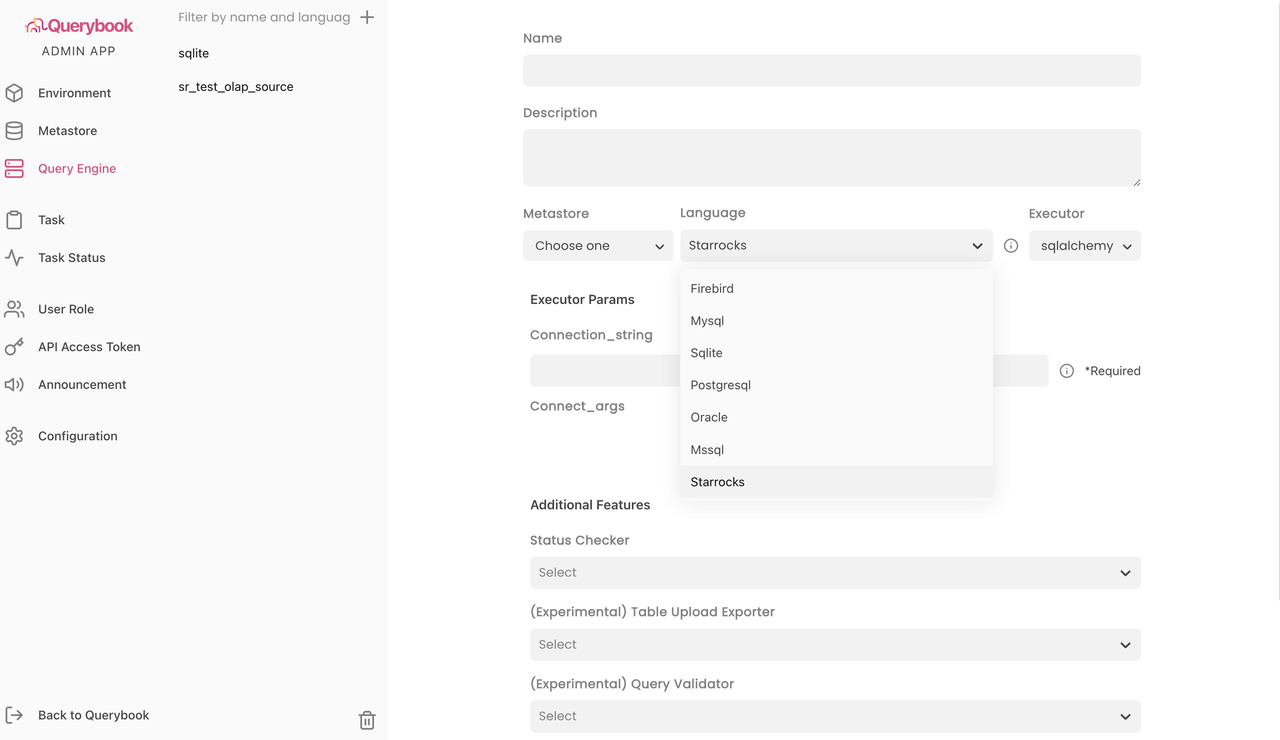
Take note of the following points:
-
For Language, select Starrocks.
-
For Executor, select sqlalchemy.
-
For Connection_string, enter a URI in the StarRocks SQLAlchemy URI format as below:
starrocks://<User>:<Password>@<Host>:<Port>/<Catalog>.<Database>The parameters in the URI are described as follows:
User: the username that is used to log in to your PhoenixAI cluster, for example,admin.Password: the password that is used to log in to your PhoenixAI cluster.Host: the endpoint of your PhoenixAI cluster.Port: the query port of your PhoenixAI cluster, for example,9030.Catalog: the target catalog in your PhoenixAI cluster. Both internal and external catalogs are supported.Database: the target database in your PhoenixAI cluster. Both internal and external databases are supported.